

Stop building dashboards nobody opens
Conversational BI
Your business has more questions than dashboards. Conversational BI is how you finally answer them
What is conversational BI?
Conversational BI (also called conversational analytics, generative BI, or GenBI) lets people ask questions about their business in plain language and get a data-backed answer in seconds. No SQL. No ticket to the BI team. No waiting a week for someone to build yet another dashboard.
If you've used ChatGPT, Claude, or Power BI Copilot, you already know the interaction. Type a question. Get an answer. Follow up. Drill in. The difference: behind the chat sits your actual business data, your actual definitions, your actual numbers.
Power BI Copilot. Tableau Pulse. ThoughtSpot Spotter. Looker Conversational Analytics. Databricks Genie. Qlik Answers. Every major BI vendor is racing to ship this layer. The category is real, and it's moving fast.
It doesn't replace your dashboards. It replaces the bad ones.
A good dashboard tells you the same story every Monday morning. Margin. On-time-in-full. Service level. Inventory cover. Conversion. The KPIs you steer on. Those stay where they are: visible, consistent, governed.
What conversational BI replaces is the long tail of one-off dashboards. The one built for a single board meeting. The Excel sheet someone rebuilds every quarter because the dashboard doesn't quite answer the question. The "can you pull me a report" emails clogging your analyst's inbox.
In most companies, 80% of dashboards are used by fewer than five people. Half get opened twice and forgotten. That's the long tail conversational BI eats.
| Use case | Best handled by |
|---|---|
| Monthly board KPI pack | Traditional dashboard |
| Daily ops cockpit (OTIF, inventory, service level) | Traditional dashboard |
| Quarterly financial close | Traditional dashboard / report |
| Regulatory or audit reporting | Traditional dashboard |
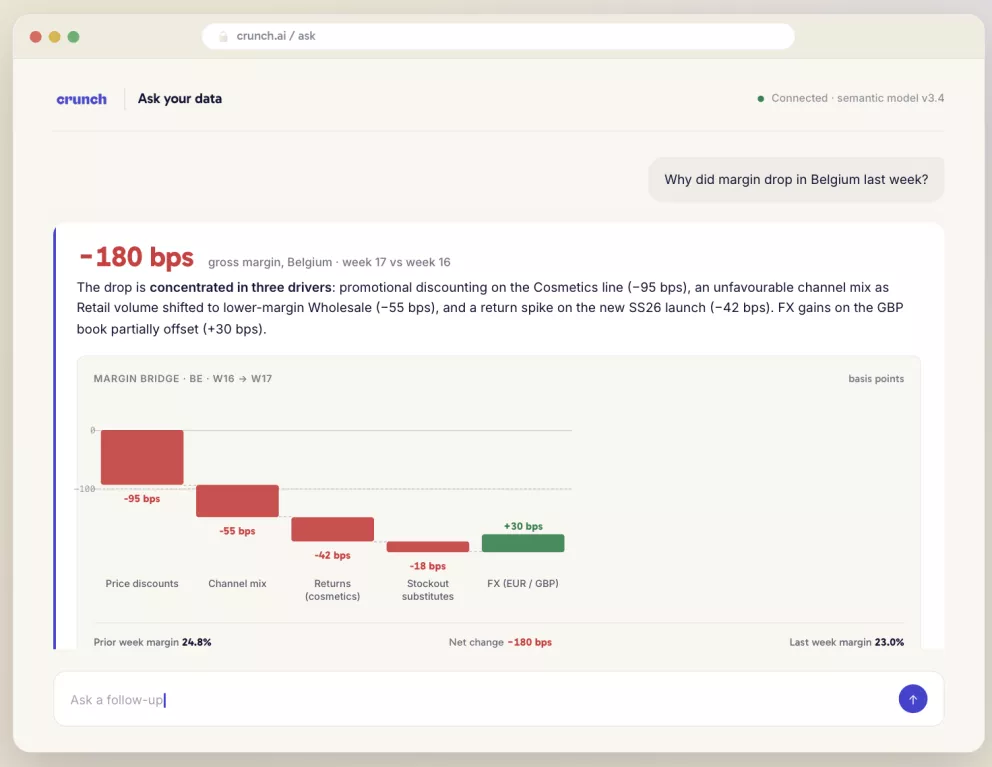
| "Why did margin drop in Belgium last week?" | Conversational BI |
| "Compare these two campaigns by ROI and customer overlap" | Conversational BI |
| "Which SKUs are at stockout risk this week?" | Conversational BI (proactive) |
| "Summarize this 14-tile dashboard for tomorrow's exec call" | Conversational BI |
The rule of thumb: if it runs every Monday, it belongs in a dashboard. If it comes up once and needs an answer fast, it belongs in a chat.
What does it look like in practice?
Ad-hoc analysis becomes simple
A trivial question is a bad use case. "What was last month's top-selling product?" Don't bother. Your existing report already shows it.
Where it shines is the messy, ad-hoc question that used to take a week. Something like:
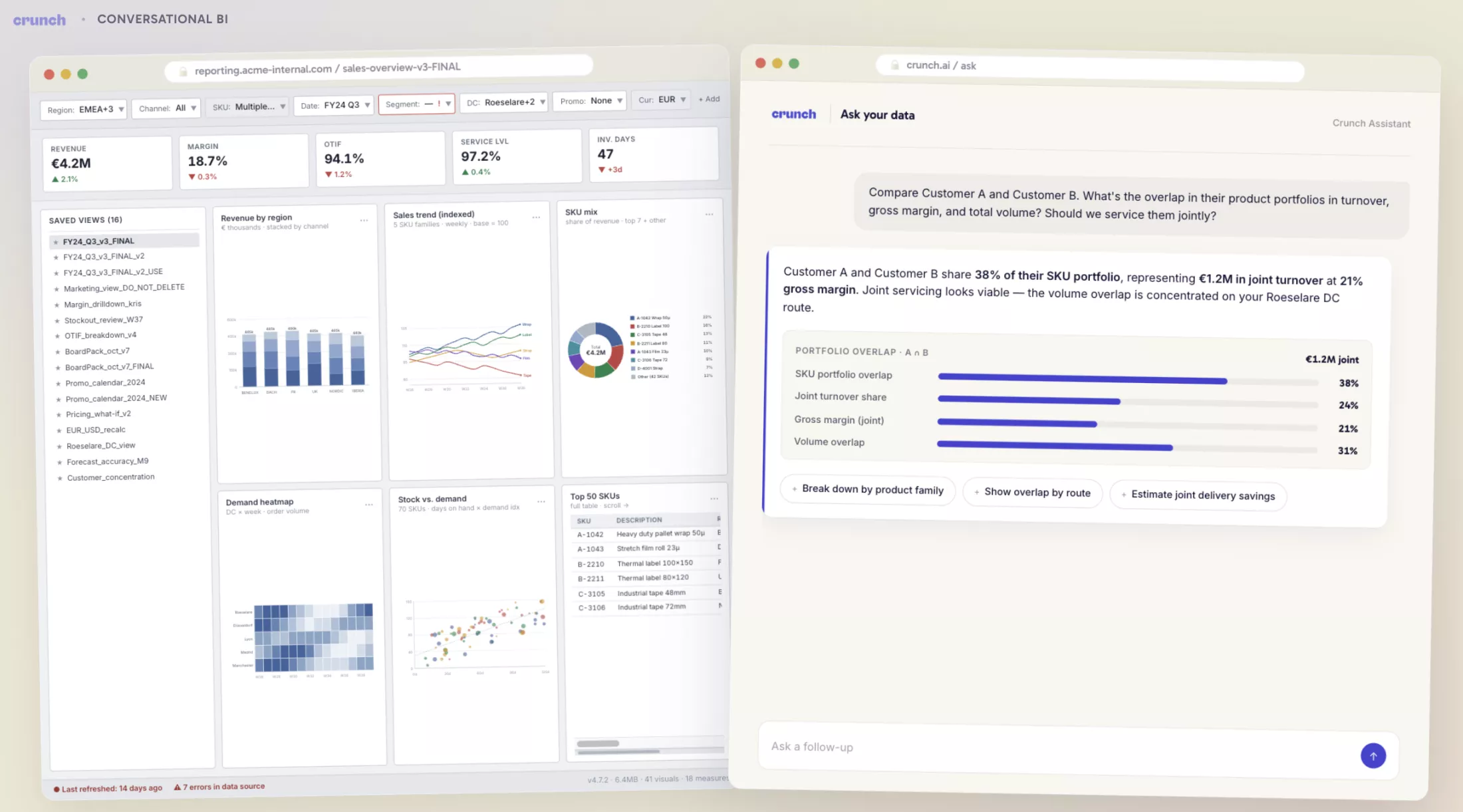
"Take Customer A and Customer B. Analyze the overlap in their product portfolios. Quantify it in turnover, gross margin, and total volume in cubic meters. I want to see if it makes sense to service them jointly."
That's a real question. A useful question. The kind a category manager actually has on a Tuesday afternoon. In the old world, you'd email an analyst, wait three days, get a half-answer, ask a follow-up, wait again. By Friday you've lost the thread.
In the new world, you type it into the chat. You get a structured answer with the numbers, the assumptions, and a chart. You ask the next question. Decision made before lunch.
How people will work differently
Conversational BI democratizes data. The marginal cost of asking a new question drops close to zero. The technical barrier disappears. Category managers, ops leads, planners: they all become their own analysts for 80% of their questions.
That's a structural shift, not a feature update.
Companies that get this right will out-decide their competitors. Not because they have more data. Because they actually use it. Companies that don't will keep building dashboards nobody opens while their analyst team drowns in tickets.
The technology is ready. The infrastructure is the bottleneck. The mentality is the multiplier.
Honest assessment, both sides.
Where it shines today, where it still falls flat
Where it works today:
- Governed KPI Q&A. "Net revenue last week by region." "Margin by category vs. last month." When your metrics are defined, the answers are reliable.
- Dashboard summaries. The AI reads your existing report and explains what changed and why. Useful for execs who don't have time to interpret a 14-tile dashboard at 7am.
- Guided exploration. The follow-ups. "Why did this happen?" "Break it down by customer segment." "Show only the stores below 80% sell-through."
- Analyst productivity. Writing DAX, SQL, semantic model docs, draft reports. The unsexy 30% of an analyst's week starts to disappear.
- Operational exception management. Stockout risk. Churn signals. Late deliveries. Margin leakage. Forecast deviations. Less chatbot, more early-warning system.
Where it still falls flat:
- Ambiguous business language. "Sales," "active customer," "margin," "available stock." Every department defines them differently. Without a semantic model, the AI guesses. And it guesses with confidence.
- Bad data made dangerous. A messy dashboard at least looks suspicious. A confident, well-written AI explanation can make bad data feel authoritative. That's a real risk.
- Causal reasoning. "Why did margin drop?" can involve price, mix, cost, returns, channel, customer discounts, stockouts, FX. Conversational BI can show you the data. It doesn't automatically solve the causal problem. You still need analysts and judgment.
- Sensitive data. The chat interface leaks data fast if row-level security is sloppy. The bigger your user base, the harder this gets.
- Trust. One or two wrong answers and adoption collapses. Conversational BI needs traceability, citations, and visible logic, not just a confident-sounding response.
The honest summary: ready for governed KPI Q&A and exception management. Not yet ready to replace your senior analysts on complex diagnostics.
How do you start?
Big companies are already using it to cut analytics costs
Here's the part most BI vendors won't say out loud. Large enterprises are deploying conversational BI to absorb work that used to flow through centralized BI teams. Routine pulls. Ad-hoc reports. "Can you slice this by region" requests. A meaningful share of that work no longer needs a human analyst. Fewer report-builders. Smaller BI teams. A clearer line between strategic data work (still very much human) and operational reporting (increasingly self-serve).
For mid-market companies, the math looks different but the direction is the same. You probably won't shrink your team. You'll get more out of the one you have. The BI developer who used to spend three days a week building one-off reports gets those three days back for the work that actually moves the business. That's where the real ROI sits.
What you need to make it work: the semantic layer
This is where most projects fail. You can't slap ChatGPT on top of Power BI and call it done. The AI doesn't know your business. It doesn't know that "customer" means something different in finance than in supply chain. It doesn't know your fiscal year starts in April. It doesn't know which of your three "revenue" columns is the right one.
What it needs is a semantic model. A clear, governed map of your data: which table holds what, which metric means what, which dimensions join cleanly, which security rules apply. Think of it as a cookbook for your business.
Every major BI vendor is building this in. Power BI semantic models. Looker's modeling layer (LookML). Tableau's published data sources. Databricks Genie's data models. ThoughtSpot's worksheets. Each is the vendor's attempt to give the AI a stable, business-readable foundation to reason over.
If you're building beyond a single BI tool, the equivalent is a stand-alone semantic layer. dbt Semantic Layer. Cube. AtScale. MetricFlow. These let you define your metrics once and serve them to BI, AI, and embedded analytics without redefining everything every time. One source of truth, many consumption layers.
Without this layer, the AI guesses. And when generative AI guesses, it guesses convincingly. Hallucinated numbers, presented with full confidence, in a board meeting. That's the nightmare scenario.
Sharpen the saw before you cut. The technology is there. Most companies just haven't done the work.
The discipline most projects skip: an evaluation framework
Conversational BI is software, not a demo. It needs to be tested like software.
A real evaluation set looks like this: 50 to 200 representative business questions, with expected answers, acceptable tolerances, edge cases, ambiguous phrasings, permission tests, and hallucination traps. You run them every time you change the semantic model, swap the underlying language model, or add new data. You track:
- Correctness. Did it return the right number?
- Interpretation. Did it explain the number correctly?
- Metric selection. Did it pick the right KPI from the catalog?
- Filter handling. Did it understand the time period, region, or segment?
- Security. Did it respect row-level permissions?
- Robustness. Does rephrasing the question change the answer?
- Latency. Is it fast enough for actual decision-making?
Most companies skip this entirely. They run a happy-path demo, declare success, roll it out, then watch trust evaporate the first time it hands a senior leader the wrong number in a meeting.
Don't be that company. Build the test set before you build the chat interface. The questions in your evaluation set should come straight from your business users, not from your data team's imagination.